
Custom Microsoft Fabric MCP endpoint in Microsoft Agent Framework - Part 1
I am currently working on my own custom MCP implementation of Fabric Data Factory for Microsoft Fabric.
While working on it, I came across an unique problem where I was making the calls to the same API across each user prompt over and over again which lead to unnecessary overhead and was a perfect recipe for performance problems.
If you have a basic understanding of Microsoft Fabric you may know that in Microsoft Fabric a workspace is the primary boundary where Fabric items are created, managed and accessed. It acts as a container for different types of Fabric artifacts such as Data Pipelines, Lakehouses, Warehouses, Notebooks, Semantic Models, and Reports.
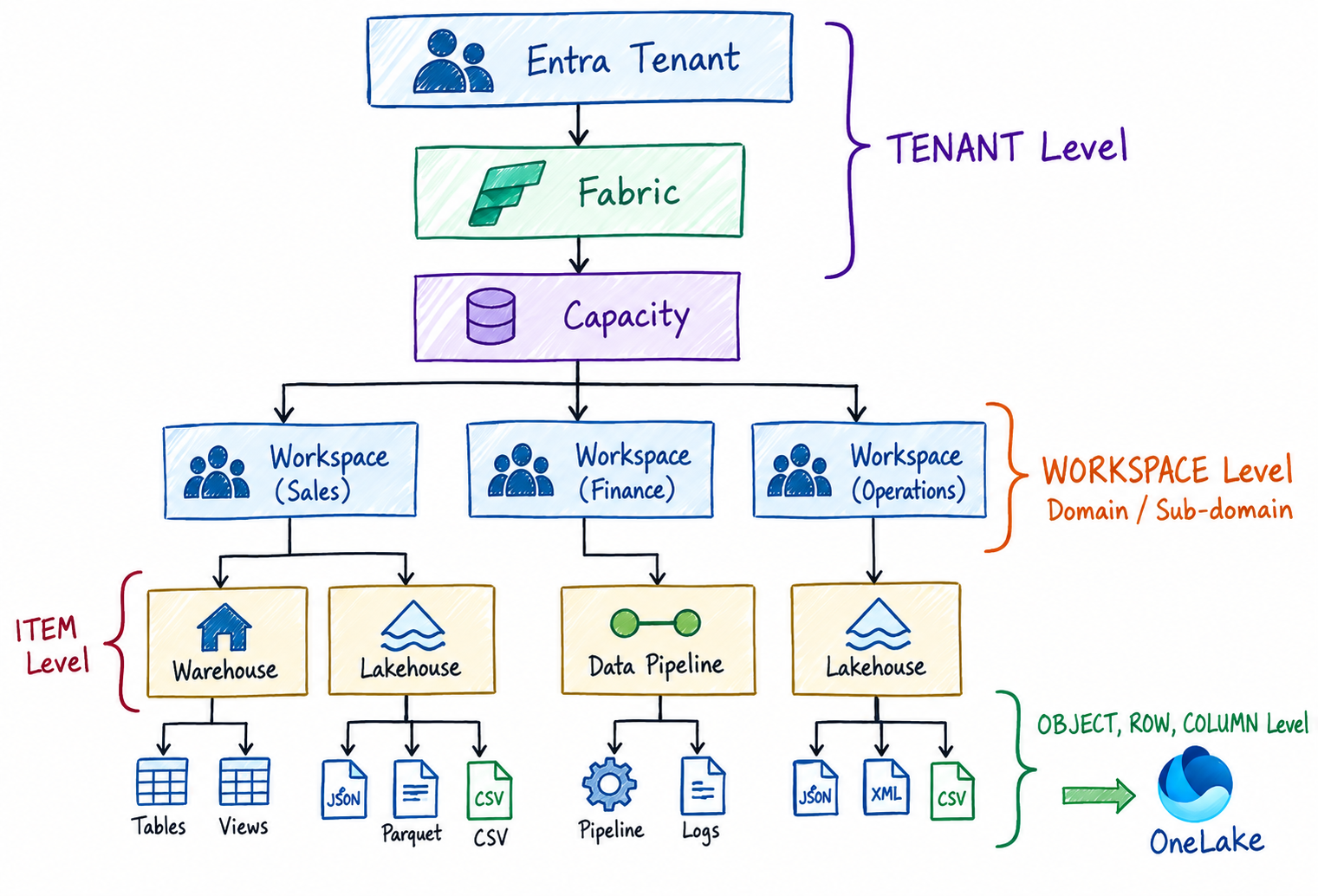
Consider a scenario where a user submits the following prompt : Give me a list of all the workspaces that exists in the Fabric tenant
The underlying agent would invoke the Workspaces API to retrieve the list.
The API call will be directed at the following Fabric endpoint
GET https://api.fabric.microsoft.com/v1/admin/workspaces
If the user prompt is : Give me a list of data pipelines under workspace Sales Analytics.
The API call will be to the following Fabric endpoint
GET https://api.fabric.microsoft.com/v1/workspaces/{WID}/dataPipelines
This time the agent would need to make a seperate API call to the Workspace API to retrieve the Workspace ID (WID) for the Workspace Sales Analytics.
Once the WID is obtained, the agent can use it to make a subsequent request to the Data Pipeline API to retrieve the relevant pipeline details that exists in the same workspace.
Now it gets a little complicated when you have to request the job execution details for a particular data pipeline.
For instance a user prompt : Get me the execution statuses of the data pipeline MoveToWareHouse under the workspace Sales Analytics
GET https://api.fabric.microsoft.com/v1/workspaces/{WID}/items/{itemId}/jobs/instances
In this case the agent would have to process three API calls(Workspace, DataPipelines and Datapipelinejobstatus) until it has the underlying details that matches the user prompt.
A seemingly simple requirement such as retrieving the list of pipelines available in a workspace can result in multiple API calls if the same information is requested repeatedly.
And also its not necessary that the user will follow the hierarchical sequence in term of object request. A user prompt may not always start by requesting a list of workspaces, followed by the data pipelines for a specific workspace and finally requesting the execution details of a particular data pipeline.
The user could start his session with a prompt : Give me all the execution statuses of data pipeline MoveToWareHouse under the workspace Sales Analytics
That is where application-level caching becomes useful. Instead of making the same Fabric API request every time the agent or workflow needs the information we can cache the response and reuse it for subsequent requests.
In this article, we will look at how to implement API calls for AI agents and how to leverage IMemoryCache in .NET can be used to avoid unnecessary repeated API calls when building agent-based or workflow-driven applications that interact with Microsoft Fabric.
Alternatively you can use any other external storage cache like Redis or Memcached.
In Part 1 of this topic, we will focus on developing an Azure Function MCP service and how to cache API responses against the user prompts.
In Part 2, we will look into developing the client application that consumes these MCP function and the overall execution of the flow.
We will use NewtonSoft JSON.Net to serialize/deserialize the API responses.
Azure Function
Create a new Azure Function for MCP project and add the following packages
dotnet add package Microsoft.Azure.Functions.Worker;
dotnet add package Microsoft.Extensions.Caching.Memory;
dotnet add packageMicrosoft.Extensions.Logging;
dotnet add package Newtonsoft.Json.Linq;
Declare Endpoint and HttpClient variables
private static string endpoint = "https://api.fabric.microsoft.com/v1";
private static readonly HttpClient client = new HttpClient();
We define three object structures to represent the API responses and maintain the hierarchy between Workspace, DataPipeline and DataPipelineJobStatus.
Workspace
DataPipeLines
DataPipeLineJobStatus
Workspace >>
public record class Workspaces
{
    public static List<Workspaces> _Workspaces { get; set; } = new();
    public static List<DataPipeLines> _DataPipeLines { get; set; } = new();
    public string id { get; set; }
    public string displayName { get; set; }
    public string description { get; set; }
    public string capacityRegion { get; set; }
}
DataPipeLines >>
public record class DataPipeLines
{
    public static List<DataPipeLines> _DataPipeLines { get; set; } = new();
    public static List<DataPipeLineJobStatus> _DataPipeLinesJobStatus { get; set; } = new();
    public string WorkspaceId { get; set; }
    public string WorkspaceName { get; set; }
    public string id { get; set; }
    public string displayName { get; set; }
    public string description { get; set; }
}
DataPipeLineJobStatus >>
public record class DataPipeLineJobStatus
{
    public static List<DataPipeLineJobStatus> _DataPipeLineJobStatus { get; set; } = new();
    public string WorkspaceName { get; set; }
    public string DataPipelineName { get; set; }
    public DateTime endTimeUtc { get; set; }
    public string itemId { get; set; }
    public string id { get; set; }
    public string status { get; set; }
    public string error { get; set; }
}
Note the hierarchy across them. The Workspace class contains a list of DataPipelines represented by List _DataPipeLines and each DataPipelines object contains a list of DataPipelineJobStatus entries represented by List _DataPipeLinesJobStatus.
GetAsync >>
Define a method called GetAsync that returns response from the HttpClient
  public async static Task<string> GetAsync(string url, string token)
  {
      client.DefaultRequestHeaders.Authorization = new System.Net.Http.Headers.AuthenticationHeaderValue("Bearer", token);
      HttpResponseMessage response = await client.GetAsync(url);
      try
      {
          response.EnsureSuccessStatusCode();
          return await response.Content.ReadAsStringAsync();
      }

      catch (HttpRequestException httpRequestException)
      {
          return httpRequestException.InnerException.ToString();
      }

  }
For every API response , we will have to create the individual provider that leverages IMemoryCache for caching the API response output.
WorkspaceProvider >>
The cacheKey is based on userId
public class WorkspaceProvider
{
private readonly IMemoryCache _cache;

  public WorkspaceProvider(IMemoryCache cache)
  {
    _cache = cache;
  }

  public async Task <List<Workspaces>> GetWorkspacesAsync(
    string userId,
    string endpoint,
    string token)
{
    string cacheKey = $ "workspaces:{userId}";

    if (_cache.TryGetValue(cacheKey, out List < Workspaces > ? workspaces)) {
      return workspaces!;
    }

    string response = await Function1.GetAsync(endpoint + "/workspaces", token);
    string workspaceresponse = await Function1.GetAsync(endpoint + "/workspaces", token);
    JObject jobjectworkspace = JObject.Parse(workspaceresponse);
    JArray jArrayworkspace = (JArray) jobjectworkspace["value"];
    Workspaces._Workspaces.Clear();
    Workspaces._Workspaces = jArrayworkspace.ToObject<List< Workspaces>>();

    _cache.Set(
      cacheKey,
      Workspaces._Workspaces,
      TimeSpan.FromMinutes(30));

    return Workspaces._Workspaces;
  }

}
In the above function, we inject IMemoryCache in the class through the class constructor. The class has a function called GetWorkspacesAsync that accepts UserId ,an API endpoint and token value to validate the API access.
The cacheKey is a combination the object type and the UserId.
string cacheKey = $ "workspaces:{userId}";
The reason to include UserId in the cacheKey is to ensure that the cached objects are scoped to the user and object access is based on the permissions the user has for an given item.
If the access details are present in the cache , return the object from the cache
 if (_cache.TryGetValue(cacheKey, out List<Workspaces>? workspaces))
 {
     return workspaces!;
 }
else parse the JSON response and extract the value array containing the workspace details.
The JSON data is then converted into an object of type List<Workspaces> object for further processing.
string response = await Function1.GetAsync(endpoint + "/workspaces",token);
string workspaceresponse = await Function1.GetAsync(endpoint + "/workspaces", token);
JObject jobjectworkspace = JObject.Parse(workspaceresponse);
JArray jArrayworkspace = (JArray)jobjectworkspace["value"];
Workspaces._Workspaces = jArrayworkspace.ToObject<List<Workspaces>>();
And then set the cache & return Workspaces._Workspaces which of type List
 _cache.Set(
     cacheKey,
     Workspaces._Workspaces,
     TimeSpan.FromMinutes(30));

 return Workspaces._Workspaces;
Repeat the same structure for DataPipeLines and DataPipeLineJobStatus and ensure that the object hierarchies are maintained.
DataPipeLineProvider >>
The cacheKey is a combination of userId and workspaceId .
public class DataPipeLineProvider
{
    private readonly IMemoryCache _cache;

    public DataPipeLineProvider(IMemoryCache cache)
    {
        _cache = cache;
    }

    public async Task<List<DataPipeLines>> DataPipeLinesAsync(
           string userId,
           string endpoint,
           string token,
           string workspaceid)
    {
         string cacheKey = $"datapipelines:{userId}_workspaceid:{workspaceid}";

        if (_cache.TryGetValue(cacheKey, out List<DataPipeLines>? datapipelines))
        {
            return datapipelines!;
        }

        string response = await Function1.GetAsync(endpoint + "/workspaces",token);

        string datapipelineresponse = await Function1.GetAsync(endpoint + $"/workspaces/{workspaceid}/items?type=DataPipeline", token);

        JObject jobjectdatapipeline = JObject.Parse(datapipelineresponse);
        JArray jArraytdatapipeline = (JArray)jobjectdatapipeline["value"];
        DataPipeLines._DataPipeLines.Clear();

       var datapipeline = jArraytdatapipeline.ToObject<List<DataPipeLines>>() ?? new List<DataPipeLines>();

DataPipeLines._DataPipeLines.Clear();
DataPipeLines._DataPipeLines.AddRange(datapipeline);

        _cache.Set(
            cacheKey,
            datapipeline,
            TimeSpan.FromMinutes(30));

        return DataPipeLines._DataPipeLines;
    }
}
DataPipeLineJobStatusProvider >>
For Datapiplelinejobstatus, I do not think its required to implement caching as job executions occur frequently. Caching the execution status can potentially result in stale data and not reflect the most recent execution state of the job.
public async Task<List<DataPipeLineJobStatus>> DataPipeLinesJobStatusAsync(string userId, string endpoint, string token, string workspaceid, string datapipelineid)

{
    string datapipelinejobstatusresponse = await Function1.GetAsync(endpoint + $"/workspaces/{workspaceid}/items/{datapipelineid}/jobs/instances", token);

    if (datapipelinejobstatusresponse != null)
    {
        JObject jobjectdatapipelinejobstatus = JObject.Parse(datapipelinejobstatusresponse);
        JArray jArraytpipelinejobstatus = (JArray)jobjectdatapipelinejobstatus["value"];
        DataPipeLineJobStatus._DataPipeLineJobStatus.Clear();
        DataPipeLineJobStatus._DataPipeLineJobStatus.AddRange(jArraytpipelinejobstatus.ToObject<List<DataPipeLineJobStatus>>().OrderByDescending(x => x.endTimeUtc).FirstOrDefault());

        foreach (var datapipelinejobstatus_ in DataPipeLineJobStatus._DataPipeLineJobStatus)
        {
            if (datapipelinejobstatus_ != null)
            {
                datapipelinejobstatus_.WorkspaceName = Workspaces._Workspaces.FirstOrDefault(a => a.id == workspaceid)!.displayName;
                datapipelinejobstatus_.DataPipelineName = DataPipeLines._DataPipeLines.FirstOrDefault(a => a.id == datapipelineid)!.displayName;
                datapipelinejobstatus_.endTimeUtc = TimeZoneInfo.ConvertTimeFromUtc(datapipelinejobstatus_.endTimeUtc, TimeZoneInfo.FindSystemTimeZoneById("India Standard Time"));
                datapipelinejobstatus_.error = jArraytpipelinejobstatus.First["failureReason"].ToString() != "" ? jArraytpipelinejobstatus.First["failureReason"]["message"].ToString() : "NONE";
            }
        }
    }

    return DataPipeLineJobStatus._DataPipeLineJobStatus;
}
MCP Methods
We have to define MCP methods to handle user prompts
GetWorkspaceDetails >>
[Function(nameof(GetWorkspaceDetails))]
public async Task<List<Workspaces>> GetWorkspaceDetails(
  [McpToolTrigger("returnworkspacelist", "returns a list of workspaces")] ToolInvocationContext context)
{
    if (context.TryGetHttpTransport(out var authHeaders))
    {
        await _workspaceProvider.GetWorkspacesAsync(authHeaders.Headers["UserId"], endpoint, authHeaders.Headers["Authorization"].Replace("Bearer ", ""));
    }
    return Workspaces._Workspaces;
}
We read UserId and Authorization headers from ToolInvocationContext. The ToolInvocationContext object is set when a call to the MCP endpoint is done an MCP client.
As mentioned earlier, UserId and Authorization values are required for setting cacheKey and user token.
This endpoint GetWorkspaceDetails invokes the GetWorkspacesAsync method from WorkspaceProvider.
GetDataPipeLinesInWorkSpace >>
[Function(nameof(GetDataPipeLinesInWorkSpace))]
public async Task<List<DataPipeLines>> GetDataPipeLinesInWorkSpace(
 [McpToolTrigger("GetDataPipeLinesInWorkSpace", "Gets the datapipelinedetails in a given workspace")] ToolInvocationContext context,
 [McpToolProperty("workspace", "WorkspaceName for which the list of data pipelines is requested", isRequired: true)] string WorkspaceName)
{
    if (context.TryGetHttpTransport(out var authHeaders))
    {
        var workspaces = await _workspaceProvider.GetWorkspacesAsync(authHeaders.Headers["UserId"], endpoint, authHeaders.Headers["Authorization"].Replace("Bearer ", ""));
        var workspaceid = workspaces.FirstOrDefault(a => a.displayName == WorkspaceName).id;
        var datapipelines = await _datapipelineProvider.DataPipeLinesAsync(authHeaders.Headers["UserId"], endpoint, authHeaders.Headers["Authorization"].Replace("Bearer ", ""), workspaceid);
        return datapipelines;
    }

    return DataPipeLines._DataPipeLines;
}
In the above code, first query the workspace object to retrieve workspaceId based on workspacename which is passed by the user prompt and then invoke DataPipeLinesAsync method of the DataPipeLineProvider class.
The DataPipeLinesAsync method determines if the Datapipelines list is returned from the cache or through an API call.
GetDataPipeLinesRunStatusInWorkSpace >>
[Function(nameof(GetDataPipeLinesRunStatusInWorkSpace))]
public async Task<List<DataPipeLineJobStatus>> GetDataPipeLinesRunStatusInWorkSpace(
 [McpToolTrigger("GetDataPipeLinesJobStatus", "Gets the datapipeline job status of a datapipeline in a given workspace")] ToolInvocationContext context,
 [McpToolProperty("workspace", "WorkspaceName in which data pipeline exists and its run status is requested", isRequired: true)] string WorkspaceName,
 [McpToolProperty("datapipeline", "DatapipelineName for which the run status is requested", isRequired: true)] string DatapipelineName)
{
    if (context.TryGetHttpTransport(out var authHeaders))
    {
        var workspaces = await _workspaceProvider.GetWorkspacesAsync(authHeaders.Headers["UserId"], endpoint, authHeaders.Headers["Authorization"].Replace("Bearer ", ""));
        var workspaceid = workspaces.FirstOrDefault(a => a.displayName == WorkspaceName).id;
        var datapipelines = await _datapipelineProvider.DataPipeLinesAsync(authHeaders.Headers["UserId"], endpoint, authHeaders.Headers["Authorization"].Replace("Bearer ", ""), workspaceid);
        var datapipelineid = datapipelines.FirstOrDefault(a => a.displayName == DatapipelineName).id;
        await _datapipelinejobstatusProvider.DataPipeLinesJobStatusAsync(authHeaders.Headers["UserId"], endpoint, authHeaders.Headers["Authorization"].Replace("Bearer ", ""), workspaceid, datapipelineid);
    }

    return DataPipeLineJobStatus._DataPipeLineJobStatus;
}
For the above function, we need to retrieve the WorkspaceId from the Workspace object and DataPipelineId from the corresponding DataPipeline object. This is required to preserve and maintain the hierarchical relationship across the objects.
Now these three providers are then passed as parameters to the Function parameter
 private readonly WorkspaceProvider _workspaceProvider;
 private readonly DataPipeLineProvider _datapipelineProvider;
 private readonly DataPipeLineJobStatusProvider _datapipelinejobstatusProvider;

 public Function1(WorkspaceProvider workspaceProvider, DataPipeLineProvider datapipelineProvider, DataPipeLineJobStatusProvider datapipelinestatusProvider)
 {
     _workspaceProvider = workspaceProvider;
     _datapipelineProvider = datapipelineProvider;
     _datapipelinejobstatusProvider = datapipelinestatusProvider;
 }
And finally we register these three providers in the Dependency Injection container alongside MemoryCache.
builder.Services.AddMemoryCache();
builder.Services.AddSingleton<WorkspaceProvider>();
builder.Services.AddSingleton<DataPipeLineProvider>();
builder.Services.AddSingleton<DataPipeLineJobStatusProvider>();
This concludes our set up of the Azure Function for MCP that leverages IMemory to reduce redundant and unnecessary API calls and their execution.
The next part of this topic would be even more interesting where we leverage Microsoft Agent Framework HandOff workflow pattern to determine the relevant MCP function invocation based on the user prompts.
Stay tuned !!!
About the author
- From Synapse Analytics, Power BI, Spark, Microsoft Fabric,ASP.NET Core and recently Agentic AI on .NET I try to explore, learn and share all aspects of Microsoft Data Stack in this blog.
Comments
Join the discussionNo comments yet. Be the first to comment.
Microsoft Agent Framework
In these blogs, I have explored the intricacies and technical nuances of the underlying architecture, implementation details, authentication flows, and real-world integration scenarios.