
Understanding the OAuth Flow for Microsoft Entra OBO(On Behalf Of) Agent Identities -Part 2
My first article on the OAuth Flow for OBO Agent Identities series explored the setup and configuration required for the OBO authentication flow.
In that article, we covered the following setup and configuration steps:
- Configured a Federated Identity Credential (FIC).
- Created a new App Registration to facilitate user token generation.
- Configured an Identifier URI and OAuth 2.0 scope for the Agent Identity Blueprint.
- Configured the
user_impersonationdelegated permission scope for Azure Storage on behalf of the signed-in user.
In this article, we will look into setting up the Azure function and the client application that calls this Azure Function to return the OBO token.
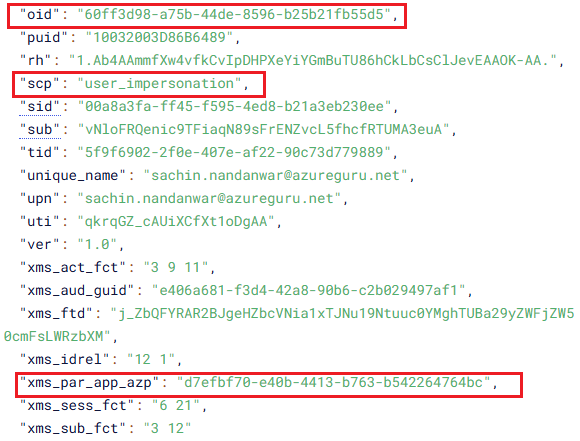
When we finally obtain the Azure Storage access token through OBO, the token claims should have the following :
- aud: Azure Storage
- scp: should contain
user_impersonation - family_name and user_name : user name details
- oid: should identify the signed-in user (user principal id)
- xms_par_app_azp: This claim identifies the blueprint that created the agent and is present only in agent identity tokens and not in standard app-only tokens.
More details here
Before you read ahead, I would suggest you to kindly familiarize with the following setups from my first article.
Setting up FIC for Agent blue prints
Setting up the identifier URI and OAuth2 scope
Configuring app registration for Tc token generation
Configuring user_impersonation delegated Scope for Azure Storage
Authentication flow Diagram
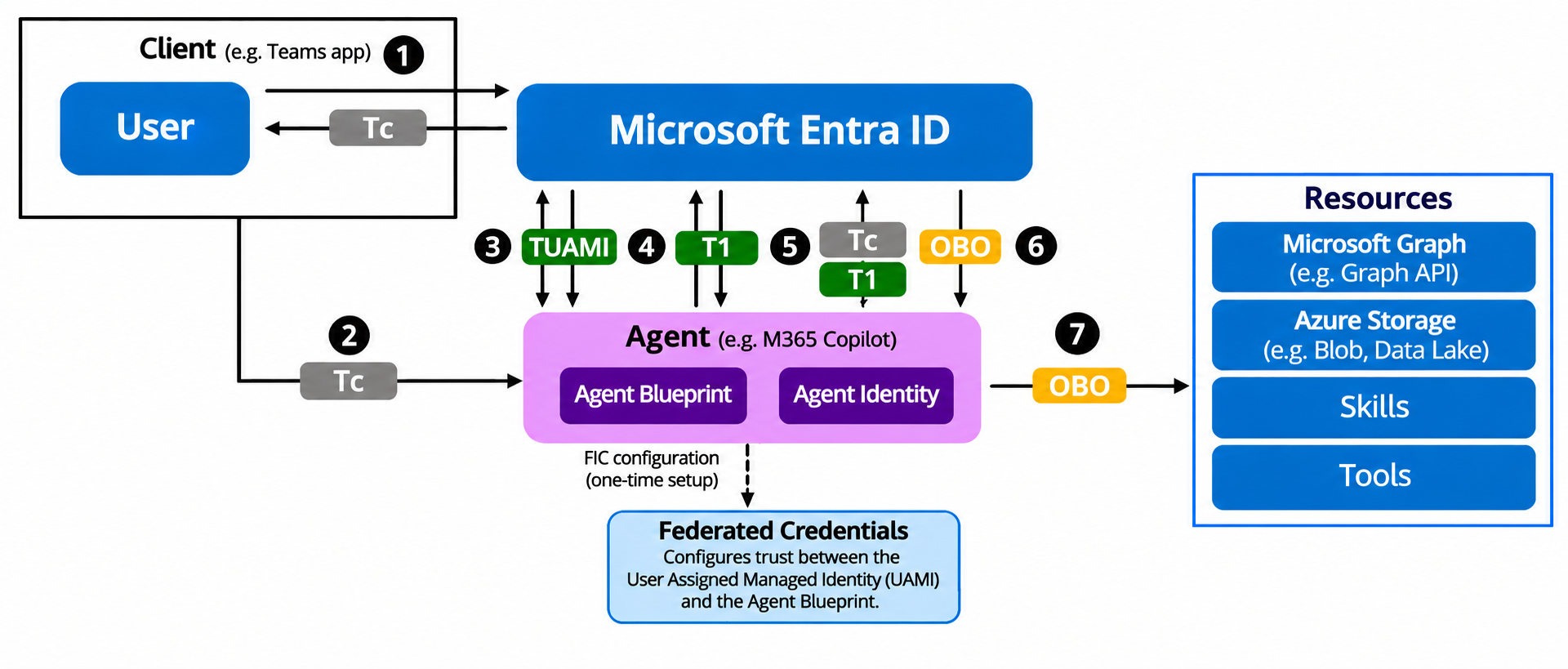
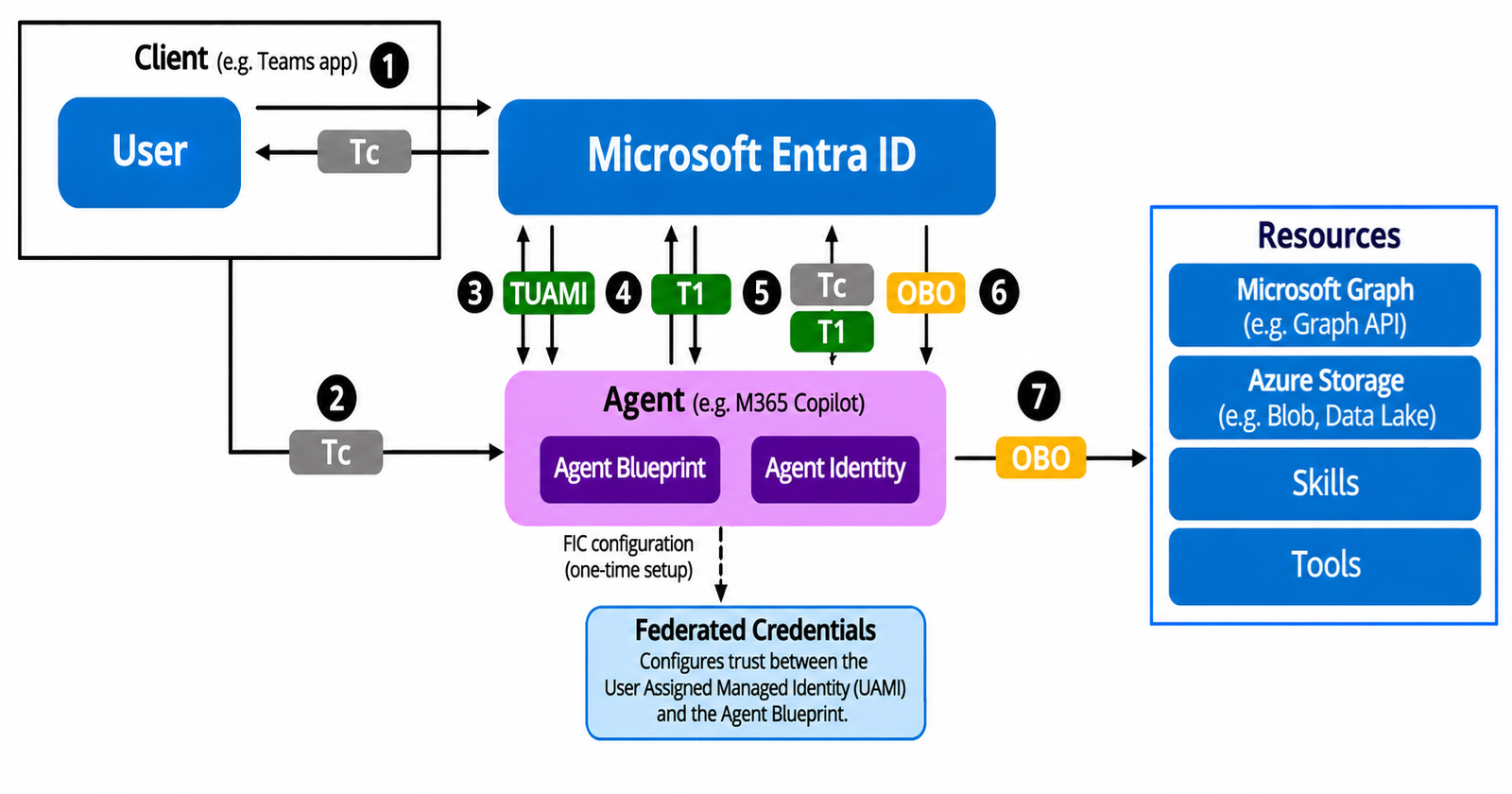
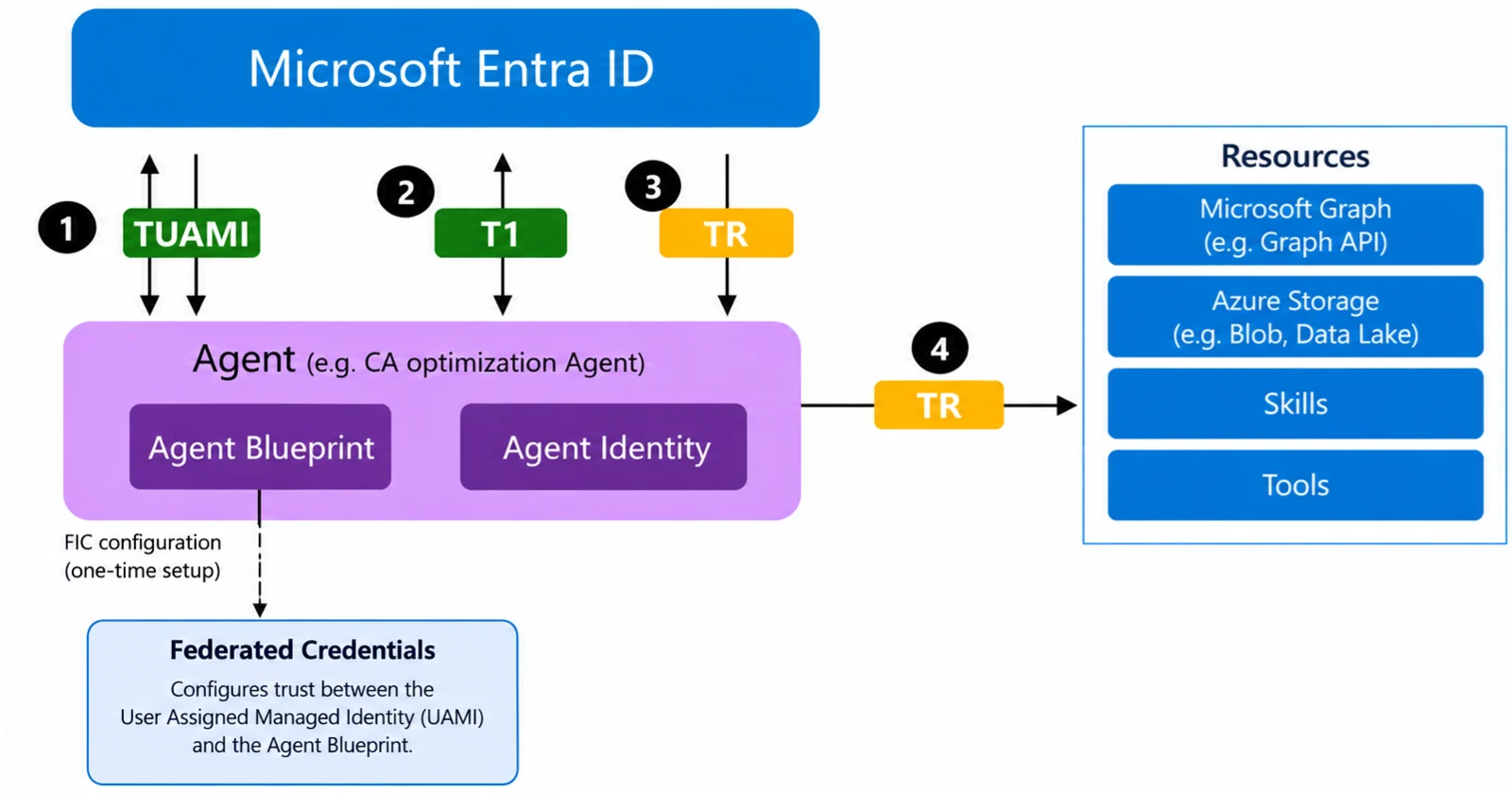
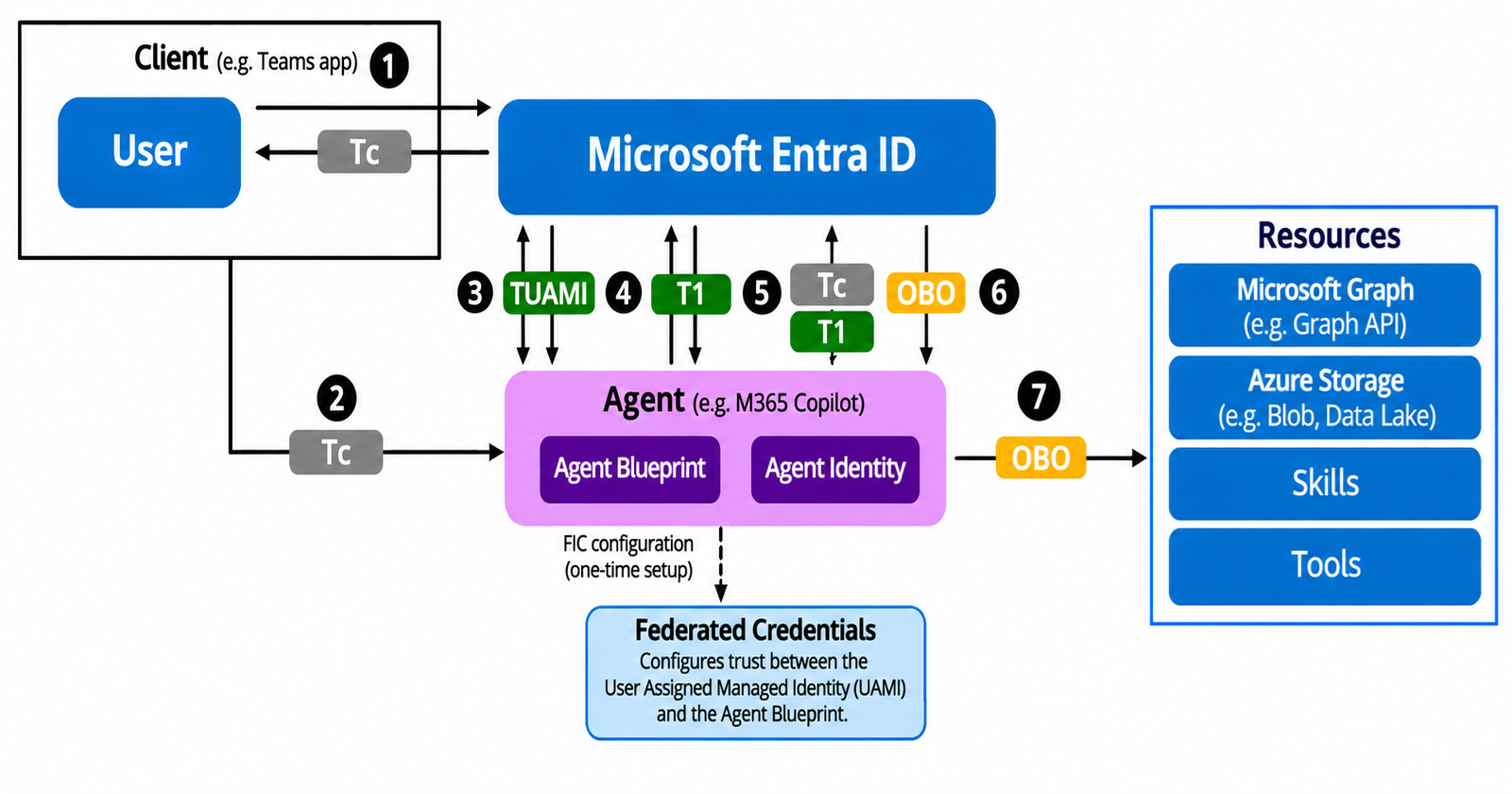
To understand the authentication flow, a user token (Tc) is first created, followed by a request for the TUAMI (User Managed Identity Token)which is then followed by the token T1 (Exchange Token) and finally the OBO token (On Behalf Of Token) is generated for the user.
Azure Storage is our final resource for which we acquire the final OBO access token.
Sequence Diagram
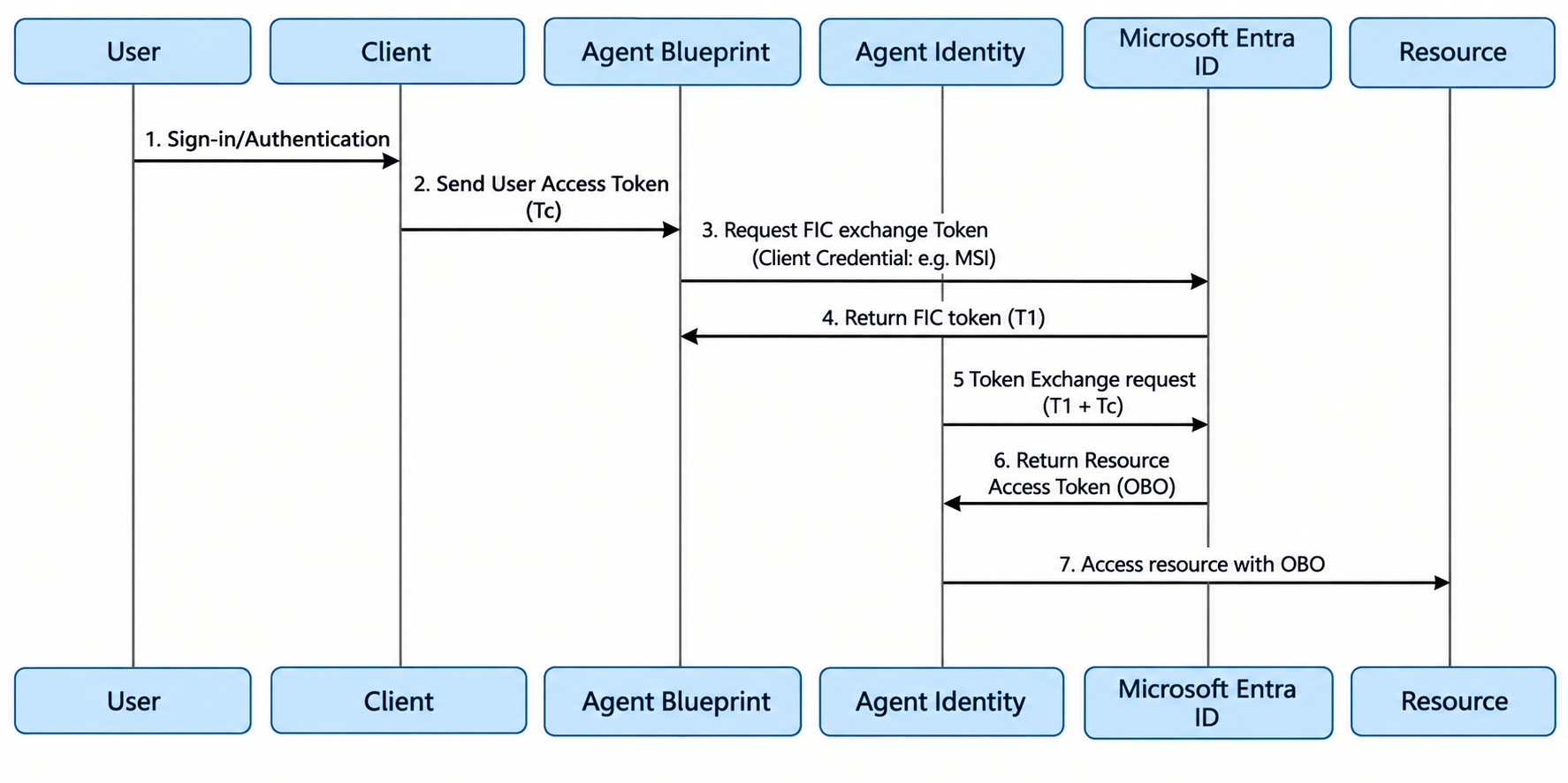
Image Credit : Microsoft
Key Considerations
- Resource in this example is Azure storage
- User signs in with his Entra tenant credentials
- The scope that user signs in with in the client application , corresponds to the blue print id and the OAUTH2 scopes of the agent identity which is
api://{Blue Print Id}/access_agentset here - The generation of the final token TR(Resource Access Token) is through an Azure Function with
aud:https://storage.azure.com - The Azure function runs on a User Managed Identity and obtains T1 through Federated token Exchange
- The same managed identity is used in setting up the Federated Credentials for the agent blueprint
- The credentials used are Federated Identity Credential (FIC) of an existing Managed Identity
- The blueprint then presents the credentials to Microsoft Entra.
- It returns TUAMI token through ManagedIdentityCredential
- The agent blueprint requests an exchange token T1 through the TUAMI token.
aud:api://AzureADTokenExchangeis used for token exchange- The Azure Function is secured through the Agent identity blue print identity provider
- Assign
user_impersonationscopes on Azure storage for the user principal id (can be done through Microsoft Graph Explorer or PowerShell MgGraph) - Token Tc is the user sign in token
- T1 is the token exchange token through FIC generated by the following code snippet
POST /oauth2/v2.0/token
Content-Type: application/x-www-form-urlencoded

client_id=AgentBlueprint id
&scope="api://AzureADTokenExchange/.default"
&fmi_path=AgentIdentity id
&client_assertion_type="urn:ietf:params:oauth:client-assertion-type:jwt-bearer"
&client_assertion=TUAMI
&grant_type="client_credentials"
UAMI >> Federated Managed Identity token
client_id >> Agent blueprint id
fmi_path >> Agent Identity id i.e. the Application id
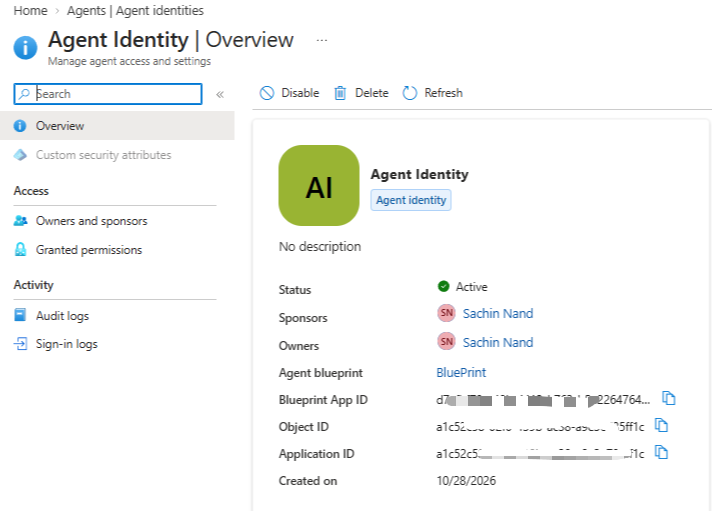
Agent Identity and Blue Print :
I have an existing Agent Identity named : Agent Identity that I am going to use
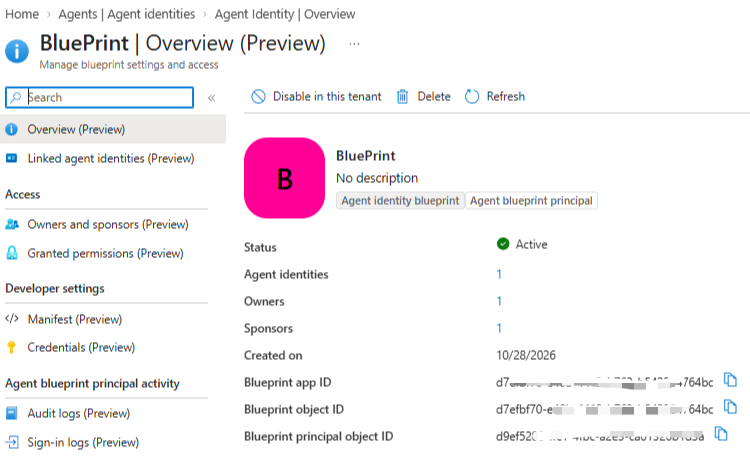
and an agent Blue Print named : Blue Print
OBO is the final On Behalf Of downstream resource token generated through the following code snippet
POST /oauth2/v2.0/token
Content-Type: application/x-www-form-urlencoded

client_id=AgentIdentity id
&scope="https://storage.azure.com/.default"
&client_assertion_type="urn:ietf:params:oauth:client-assertion-type:jwt-bearer"
&client_assertion={T1}
&grant_type="urn:ietf:params:oauth:grant-type:jwt-bearer"
&assertion={Tc(aud=AgentIdentity Blueprint, oid=User)}
&requested_token_use="on_behalf_of"
Note : The scope used here is https://storage.azure.com/.default
Azure Function
This is an very important aspect in the entire flow.
Create a new Azure Function and add the following references
dotnet add package Azure.Core;
dotnet add package Azure.Identity;
dotnet add package Microsoft.AspNetCore.Http;
dotnet add package Microsoft.AspNetCore.Mvc;
dotnet add package System.Text.Json;
Add bunch of variables and set up the constructor for logger
string TenantId = "Tenant id";
string UserManagedIdentityId = "Client id of user assigned managed identity";
string AgentIdentityId = "Agent identity id";
string AgentBluePrintId ="Blue Print id of the agent identity" ;

private readonly ILogger<Function1> _logger;
private static readonly HttpClient client = new HttpClient();
public HttpClient Client => client;

public Function1(ILogger<Function1> logger)
{
    _logger = logger;
}
I will walk through the process step by step explaining how to obtain different types of token.
Under the function Function_Return_T1 of type Get
[Function("Function_Return_T1")]
public async Task<IActionResult> Run(
 [HttpTrigger(AuthorizationLevel.Anonymous, "get")] HttpRequest req)
{

}
add the following code
TUAMI (Token Managed Identity) >>
We will use ManagedIdentityCredential to generate the TUAMI token based on the federated credentials through Managed Identity.
  var miCredential = new ManagedIdentityCredential(
      ManagedIdentityId.FromUserAssignedClientId(
          UserManagedIdentityId));
  var assertionContext = new TokenRequestContext(
      new[] { "api://AzureADTokenExchange/.default" });

  AccessToken assertionToken;
  try
  {
      assertionToken = await miCredential.GetTokenAsync(
          assertionContext,
          CancellationToken.None);
  }
  catch (Exception ex)
  {
      _logger.LogError(ex, "UAMI assertion token failed");

      return new ObjectResult(new
      {
          stage = "UAMI assertion token acquisition",
          exceptionType = ex.GetType().FullName,
          error = ex.Message,
          details = ex.ToString()
      })
      {
          StatusCode = 500
      };
  }

  string TUAMI = assertionToken.Token;
The resulting access token value is stored in the variable TUAMI .
T1 Token >>
Earlier in the article I mentioned of using the following request to obtain token T1
POST /oauth2/v2.0/token
Content-Type: application/x-www-form-urlencoded

client_id=AgentBlueprint id
&scope="api://AzureADTokenExchange/.default"
&fmi_path=AgentIdentity id
&client_assertion_type="urn:ietf:params:oauth:client-assertion-type:jwt-bearer"
&client_assertion=TUAMI
&grant_type="client_credentials"
Implement the above POST request in C# in the function Function_Return_T1
var parameters_T1 = new Dictionary<string, string>
 {
      ["client_id"] = AgentBluePrintId,
      ["scope"] = "api://AzureADTokenExchange/.default",
      ["fmi_path"] = AgentIdentityId,
      ["client_assertion_type"] = "urn:ietf:params:oauth:client-assertion-type:jwt- bearer",
      ["client_assertion"] = TUAMI,
      ["grant_type"] = "client_credentials"
 };

 HttpContent contents = new FormUrlEncodedContent(parameters_T1);

 var HttpMessage_T1 = new HttpRequestMessage
 {
     Method = HttpMethod.Post,
     RequestUri = new Uri($"https://login.microsoftonline.com/{TenantId}/oauth2/v2.0/token"),
     Content = contents
 };

 HttpResponseMessage response_T1 = await client.SendAsync(HttpMessage_T1);

 string T1;

 try
 {
     response_T1.EnsureSuccessStatusCode();

     using JsonDocument doc = JsonDocument.Parse(response_TUAMI.Content.ReadAsStringAsync().Result);

     T1 = doc.RootElement
        .GetProperty("access_token")
        .GetString()!;

 }
 catch (Exception ex)
 {
     _logger.LogError(ex, "Federated token exchange failed");

     return new ObjectResult(new
     {
         stage = "Federated token exchange",
         exceptionType = ex.GetType().FullName,
         error = ex.Message,
         details = ex.ToString()
     })
     {
         StatusCode = 500
     };

 }
The resulting access token is stored under variable T1.
We will require another function called Function_Return_OBO to return the OBO token.
You might ask why ?
Have a look at the following POST request required for generation of the OBO token
POST /oauth2/v2.0/token
Content-Type: application/x-www-form-urlencoded

client_id=AgentIdentity
&scope="https://storage.azure.com/.default"
&client_assertion_type="urn:ietf:params:oauth:client-assertion-type:jwt-bearer"
&client_assertion={T1}
&assertion={Tc}
&requested_token_use="on_behalf_of"
Our earlier function, Function_Return_T1 generates the T1 token, which is required as part of the client_assertion in the above POST request alongside the user token (Tc) used for the assertion value above.
The function
Function_Return_OBOaccepts Tc(User token) and T1 (Exchange token) as its arguments .The client application generates the Tc token and will first make a call to the functionFunction_Return_T1. This function returns T1 value and the client would then invoke the functionFunction_Return_OBO
I hope I am making sense 🙄🙄
Next, implement the above POST request to generate the OBO token in C# in a new function called Function_Return_OBO.
 [Function("Function_Return_OBO")]
 public async Task<IActionResult> Run_1(
 [HttpTrigger(AuthorizationLevel.Anonymous, "get")] HttpRequest req, string Tc, string T1)
 {

     var parameters_OBO = new Dictionary<string, string>
     {
         ["client_id"] = AgentIdentityId
         ["scope"] = "https://storage.azure.com/.default",
         ["grant_type"] = "urn:ietf:params:oauth:grant-type:jwt-bearer",
         ["client_assertion_type"] = "urn:ietf:params:oauth:client-assertion-type:jwt-bearer",
         ["client_assertion"] = T1,
         ["assertion"] = Tc,
         ["requested_token_use"] = "on_behalf_of"
     };

     HttpContent contents = new FormUrlEncodedContent(parameters_OBO);

     var HttpMessage_OBO = new HttpRequestMessage
     {
         Method = HttpMethod.Post,
         RequestUri = new Uri($"https://login.microsoftonline.com/{TenantId}/oauth2/v2.0/token"),
         Content = contents
     };

     HttpResponseMessage response_OBO = await client.SendAsync(HttpMessage_OBO);
     return new OkObjectResult(new
     {
         reponse = response_OBO.Content.ReadAsStringAsync().Result,
         stage = "Function_Return_OBO",
         message = "Function_Return_OBO success"
     });
 }
Deploy the Azure function to Azure. Once deployed you will see two functions
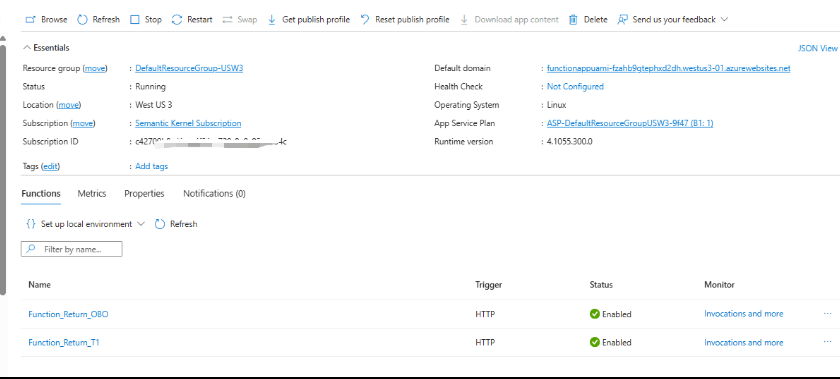
Authentication for Azure Function
The functions (Function_Return_T1 and Function_Return_OBO) will be invoked by the client application, so we need to ensure that the user access token(Tc) passed by the client application is properly authenticated and validated by the function.
Also recall that earlier in the article I mentioned the following :
The scope that user signs in with in the client application , corresponds to the blue print id of the agent identity
api://{Blue Print Id}/access_agent
So considering the above two aspects, we will have to set Authentication for the deployed Azure Functions
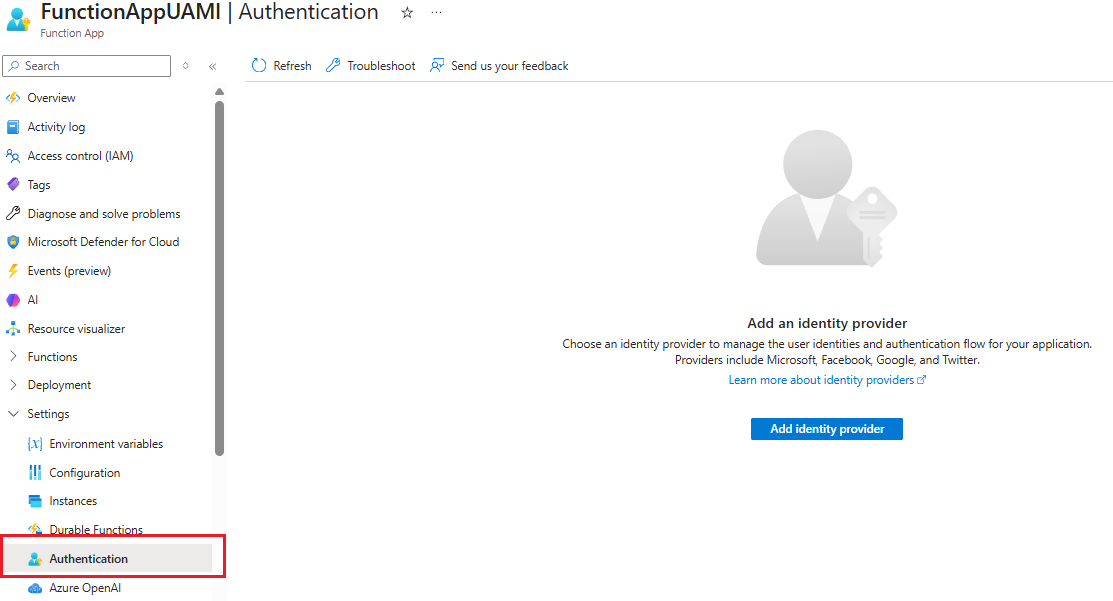
For authentication , we configure the value of Application(client) ID property of the identity provider to the agent blue print id and the Allowed token audiences property value to the scope value of the client application which in this example is api://d7efbf70-e40b-4413-b763-b542264764bc/access_agent where d7efbf70-e40b-4413-b763-b542264764bc is the blue print id and access_agent is the OAUTH2 scope that we configured in the first article. You can check that here.
The aud from the output of T1 token from the above screencast is the token exchange value generated by Entra during the token exchange.
The Allowed client applications value in the set up is set to the client id of the app registration.
I have explained the reason here as why we cant use the blueprint id as the client id for Tc token generation.
We can ignore the following warning while setting up authentication.

Console Client Application
I used the PublicClientApplicationBuilder class of the Microsoft.Identity namespace from MSAL library for signed in user token generation Tc.
Authentication.cs >>
using Microsoft.Identity.Client;

namespace Security
{
    internal class Authentication
    {
        public static bool istokencached = false;
        public static string clientId = "App registration client Id";
        private static string[] scopes = { "api://{blue print id}/access_agent" };
        private static string Authority = "https://login.microsoftonline.com/organizations";
        private static string RedirectURI = "http://localhost";

        public async static Task<AuthenticationResult> ReturnAuthenticationResult()
        {
            string AccessToken;
            PublicClientApplicationBuilder PublicClientAppBuilder =
                PublicClientApplicationBuildekr.Create(clientId)
                .WithAuthority(Authority)
                .WithCacheOptions(CacheOptions.EnableSharedCacheOptions)
                .WithRedirectUri(RedirectURI);

            IPublicClientApplication PublicClientApplication = PublicClientAppBuilder.Build();
            var accounts = await PublicClientApplication.GetAccountsAsync();
            AuthenticationResult result;
            try
            {
                result = await PublicClientApplication.AcquireTokenSilent(scopes, accounts.First().ExecuteAsync().ConfigureAwait(false);
            }
            catch
            {
                result = await PublicClientApplication.AcquireTokenInteractive(scopes)
                                 .ExecuteAsync()
                                 .ConfigureAwait(false);
            }
            istokencached = true;
            return result;

        }
    }
}
HttpMethod.cs >>
This class inherits the above class
using System.Net.Http.Headers;
using Microsoft.Identity.Client;

namespace Http
{
    internal class HttpMethods : Security.Authentication
    {
        public static string access_token = "";
        public static readonly HttpClient client = new HttpClient();
        protected HttpClient Client => client;

        public async static Task<string> GetAsync(string url)
        {
            AuthenticationResult result = await ReturnAuthenticationResult();
            client.DefaultRequestHeaders.Authorization = new AuthenticationHeaderValue("Bearer", result.AccessToken);

            access_token = result.AccessToken;
            HttpResponseMessage response = await client.GetAsync(url);
            try
            {
                response.EnsureSuccessStatusCode();
                return await response.Content.ReadAsStringAsync();
            }
            catch
            {
                Console.WriteLine(response.Content.ReadAsStringAsync().Result);
                return null;
            }
        }
    }
}
Program.cs >>
using System.Text.Json;

namespace Tokens
{
    internal class Program
    {
        static async Task Main(string[] args)
        {
            await GenerateTokens();
        }

        public async static Task<string> GenerateTokens()
        {
            string baseUrl = $"{Azure Function URL}/api/Function_Return_T1";
            var response_T1 = await Http.HttpMethods.GetAsync(baseUrl);

            using JsonDocument doc_1 = JsonDocument.Parse(response_T1);

            var T1_Token = doc_1.RootElement
                .GetProperty("response")
                .GetString()!;

            baseUrl =
               $"{Azure Function URL}/api/Function_Return_OBO" +
               $"?Tc={Uri.EscapeDataString(Http.HttpMethods.access_token)}" +
               $"&T1={Uri.EscapeDataString(T1_Token)}";

            var response_Tc = await Http.HttpMethods.GetAsync(baseUrl);

            using JsonDocument doc_2 = JsonDocument.Parse(response_Tc);

            var TC_Token = doc_2.RootElement
                .GetProperty("reponse")
                .GetString()!;
            return TC_Token;

        }
    }
}
Tc token
Here we check values of client token Tc
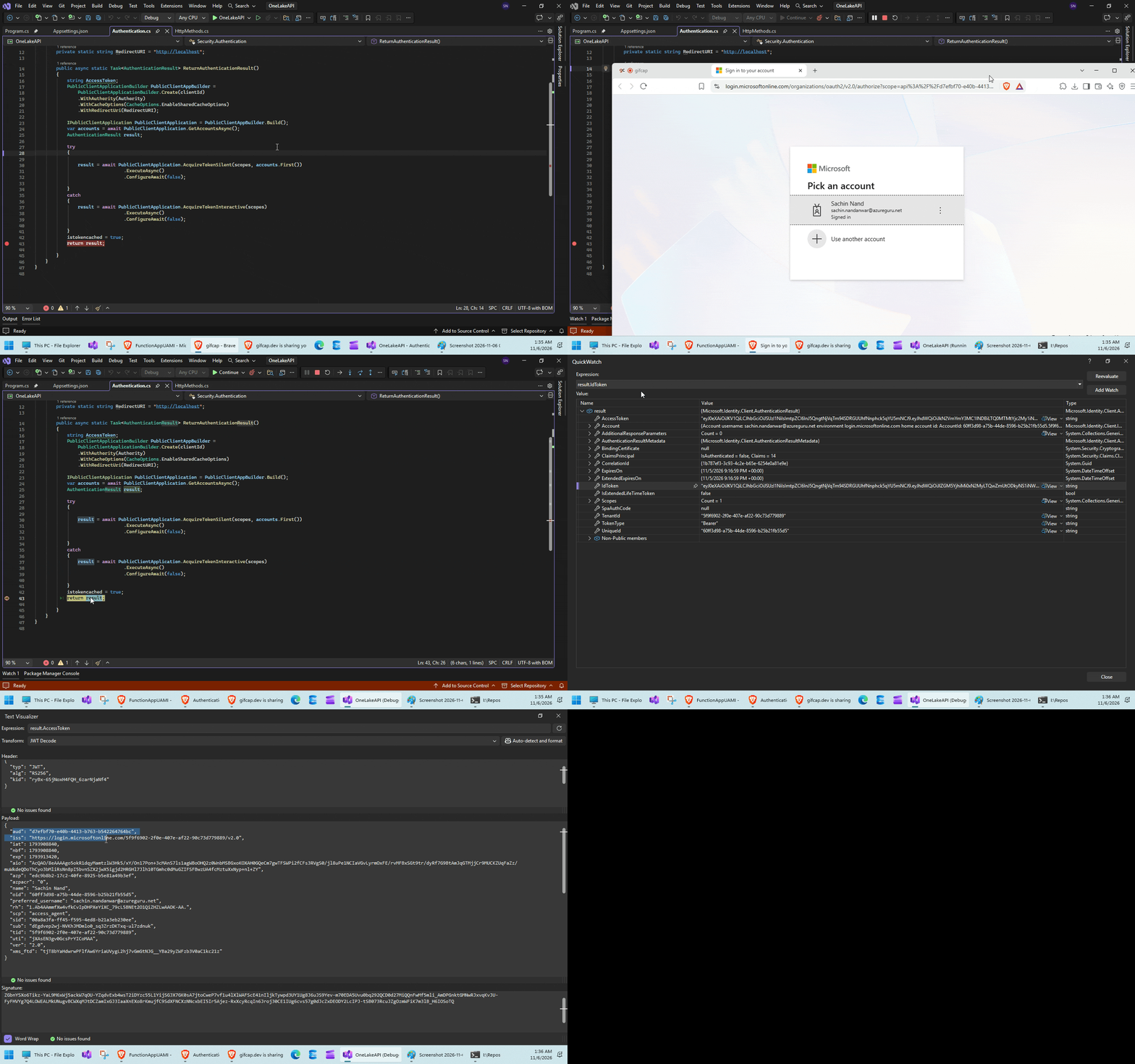
Execution
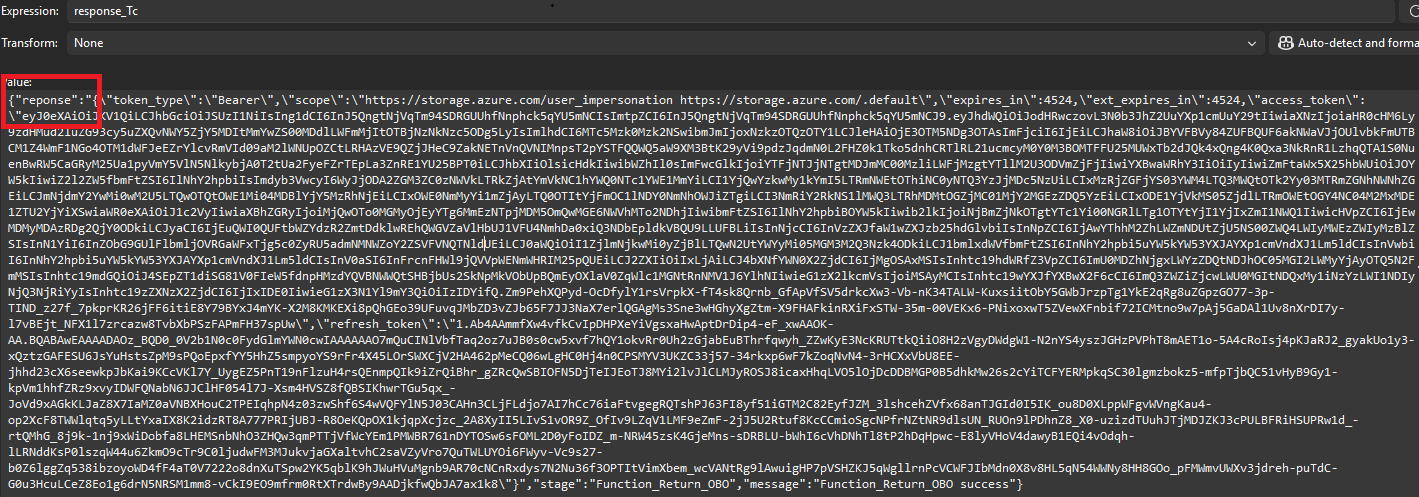
Note the red block above. You will have to Zoom In a bit look at it. The final resource Token is returned as reponse and not response. So be aware of this misspelling.
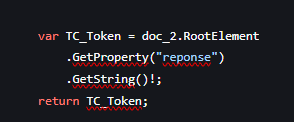
This is the reason why in my code I had to parse the response json with keyword reponse and not response
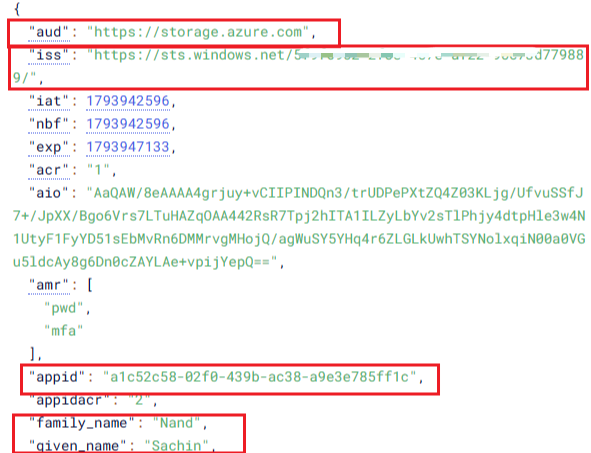
Now, lets inspect our token :
So our OBO token returned the final downstream resource aud value which in our example is Azure storage and the appid value which is our agent identity id which proves that the agent is acting on behalf of the user and iss value which is the issuer for my tenant. Also returned are the user details.
More details here. I had to blur my tenant id in the screenshot below.
In this part we have the oid which is the user principal id and scp with value user_impersonation and xms_par_app_azp value of blue print id which confirms that this is an agent identity token
We did it.. Woo-hoo !!!
Conclusion
So in this two part series we have delved into all the underlying details of configuring and setting up an OAuth Flow for Microsoft Entra OBO agent identities.
We walked through the process of configuring the necessary permissions using Microsoft Graph APIs and demonstrated how tokens are exchanged across different stages of the flow there by enabling an agent to generate access tokens for the downstream resources (in this example Azure storage) on behalf of an authenticated user.
I hope this series provides a deeper understanding of the OAuth flow for Microsoft Entra Agent Identities and serves as a reference for developers looking to implement secure, delegated access in their agent architectures.
Thanks for reading !!!
About the author
- From Synapse Analytics, Power BI, Spark, Microsoft Fabric,ASP.NET Core and recently Agentic AI on .NET I try to explore, learn and share all aspects of Microsoft Data Stack in this blog.
Comments
Join the discussionNo comments yet. Be the first to comment.