Customizing Scalar UI for .NET APIs

Starting with .NET 9, Swagger (Swashbuckle) is no longer included by default in the web API templates. This was because there were major issues with Swagger.
There are several alternatives available, one of which is Scalar. Microsoft introduced the Microsoft.AspNetCore.OpenApi package to generate OpenAPI documentation but unlike Swagger it does not provide a built-in UI. This is where Scalar fits perfectly.
In an earlier post we explored the methods of implementing JWT tokens in Minimal API’s for .NET core.In this post we will look into how we can modify the Scalar UI and overcome a major UI shortcoming.
SetUp
Create a new ASP.NET core Web API project and select the .NET 10.0(preferred) framework. Also ensure that you check the “Enable OpenAPI support” option.

add the following Nuget packages to the project
dotnet add package Microsoft.AspNetCore.Authentication.JwtBearer --version 10.0.3
dotnet add package Microsoft.AspNetCore.OpenApi --version 10.0.0
dotnet add package Scalar.AspNetCore --version 2.11.10
In the next step add app.MapScalarApiReference(); to Program.cs to map the routes.
If you navigate to /Scalar/V1 you will see the Scalar UI

Lets check the different configuration options for the Scalar UI.
app.MapScalarApiReference(options =>
{
    options.Title = "Scalar API";
    options.DarkMode = true;
    options.Favicon = "path";
    options.DefaultHttpClient = new KeyValuePair<ScalarTarget, ScalarClient>(ScalarTarget.CSharp, ScalarClient.RestSharp);
    options.HideModels = false;
    options.Layout = ScalarLayout.Modern;
    options.ShowSidebar = true;
    options.Authentication = new ScalarAuthenticationOptions
    {
        PreferredSecuritySchemes = new List<string> { "Bearer" }
    };
});
Below in an option setting that sets the DefaultHttpClient to CSharp and RestSharp by default.
options.DefaultHttpClient = new KeyValuePair<ScalarTarget, ScalarClient>(ScalarTarget.CSharp, ScalarClient.RestSharp);

There are multiple different options to chose from for setting the DefaultHttpClient

If you notice carefully there is no built-in option to add an authentication token to validate the defined API endpoints for a specific route.
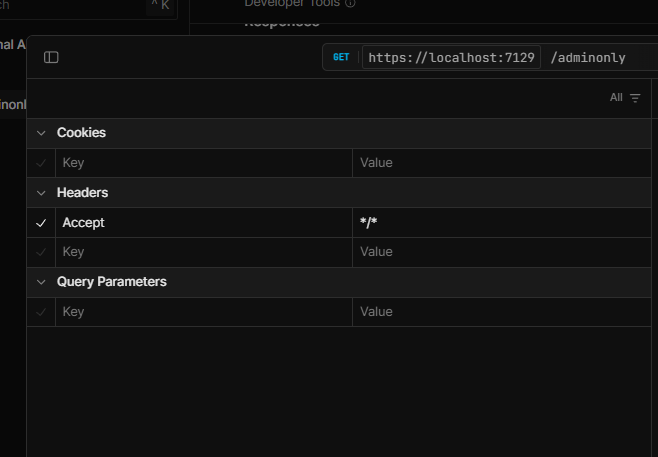
We will look into how make this option available on the Scalar UI.
JWT Tokens
To get started we will have to first implement JWT token authentication to enable authenticated calls to the API routes.
Please refer to my article on implementing JWT tokens for Minimal API’s
https://www.azureguru.net/implementing-jwt-tokens-in-minimal-api-net-core
To modify the Scalar UI to provide a placeholder for the Bearer tokens, we have to implement document transformer i.e. a Transformer class in OpenAPI. The detailed documentation can be found here and the solution here.
The credit goes to Nikoli Ervin https://github.com/nikolliervin
Transformer class : BearerSecuritySchemeTransformer.cs
internal sealed class BearerSecuritySchemeTransformer : IOpenApiDocumentTransformer
{
    private readonly IAuthenticationSchemeProvider _authenticationSchemeProvider;

    public BearerSecuritySchemeTransformer(IAuthenticationSchemeProvider authenticationSchemeProvider)
    {
        _authenticationSchemeProvider = authenticationSchemeProvider;
    }

    public async Task TransformAsync(OpenApiDocument document, OpenApiDocumentTransformerContext context, CancellationToken cancellationToken)
    {
        var authenticationSchemes = await _authenticationSchemeProvider.GetAllSchemesAsync();

        if (authenticationSchemes.Any(authScheme => authScheme.Name == "Bearer"))
        {
            document.Components ??= new OpenApiComponents();
            document.Components.SecuritySchemes ??= new Dictionary<string, IOpenApiSecurityScheme>();
            document.Components.SecuritySchemes["Bearer"] = new OpenApiSecurityScheme
            {
                Type = SecuritySchemeType.Http,
                Scheme = "bearer",
                In = ParameterLocation.Header,
                BearerFormat = "JWT"
            };

            foreach (var operation in document.Paths.Values.SelectMany(path => path.Operations))
            {
                if (operation.Value.Security == null)
                {
                    operation.Value.Security = new List<OpenApiSecurityRequirement>();
                }
                var securityRequirement = new OpenApiSecurityRequirement
                {
                    [new OpenApiSecuritySchemeReference("Bearer", document)] = []
                };

                operation.Value.Security ??= new List<OpenApiSecurityRequirement>();
                operation.Value.Security.Add(securityRequirement);
            }
        }
    }
Once you have the class, register the transformer so that OpenAPI can internally use it later .
builder.Services.AddOpenApi(options =>
{
    options.AddDocumentTransformer<BearerSecuritySchemeTransformer>();
});
This sets up the Authentication option on the Scalar UI.

Lets go ahead and test it

As seen above, we did not pass the Authorization token in the request header the way we had in the previous article, instead a placeholder was made available on the UI for the token as the result of the transformer class.
Conclusion
I hope this bug is fixed in sometime in the near future. Until then the only option seems to be an implementation of the transformer class. While it adds a small amount of extra setup it provides a reliable workaround until an official fix is released.
Thanks for reading !!!




