Configuring federated credentials in Microsoft Azure for GitHub Actions

Federated identity in Microsoft Azure allows organizations to establish trust relationships between different identity providers that enables users to access Azure resources using existing credentials from other platforms. By integrating Azure with GitHub, developers can streamline authentication processes, improve security, and simplify access management across both environments. This approach supports modern identity standards such as OAuth 2.0 and OpenID Connect (https://openid.net/connect/), making it ideal for multi app cloud-based connectivity.
Why do we need federated credentials?
Managing secrets is hard, as I explained it multiple times across many of my blogs. Its quite hard to maintain them with maintenance overhead and inherent security risks.
What are federated credentials?
Federated credentials is about allowing a pre-configured external identity provider to request tokens for an application in Azure AD. Instead of using a certificate or client security to sign the token request , Azure AD is configured to trust tokens issued by the external identity provider such as Github as valid equivalents to client credentials.
This is the typical federated credentials pattern where the client application requires a service that requires authentication through Azure AD through a pre configured trust relationship.
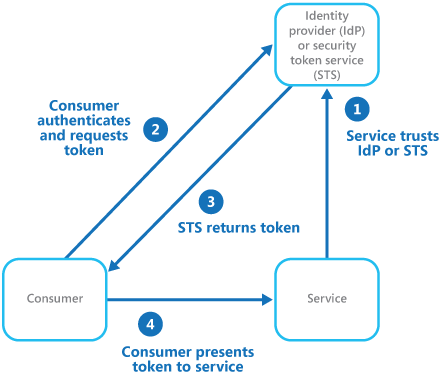
Image Credit : Microsoft
GitHub Actions
We can use GitHub actions that triggers a workflow authenticated through Azure AD. We could theoretically use the steps mentioned in the following blog for Github Actions but I haven’t tested that approach yet.
https://www.azureguru.net/azure-services-authentication-through-microsoft-managed-identity
As there is a pre configured trust relationship of GitHub Actions with Azure AD built out of the box we can skip many of the steps listed in the above blog.

Federated credentials are associated with Service Principal. So in practice, the service principal on which the federated credentials are set , should have requisite role assignments and permissions to the underlying Azure resources that it needs to access else the workflow would fail.
SetUp
Create a new GitHub repository or we could use an existing one on which you would like to execute GitHub Actions.
Choose a service principal from your Entra Account that you want to configure federated credentials.
Select “Certificates & Secrets” and then under “Federated Credentials” click “Add credential“

In the new window, select “GitHub Actions deploying Azure resources”

In the next step enter the following details

Organization is the name of the username or the organization name of the repo
Repository is the name of the repository that you want to use
Entity is the type of entity. Following are the options .

Based on selection specifies the repo branch through which the request would be trusted by Azure AD
Audience keep it default
Now go back and double check if the Federated Credentials are created under Certificates & secrets under the service principal

We now need to set the environment variables for the GitHub repository.
Go to the repository and under “Secrets and variables”

and under Actions declare the following Repository secrets and enter the corresponding values

you can get the details of the above values from the Service Principal that you have used to set the GitHub actions on

The value of the Subscription ID is obtained from the subscription used in your Azure tenant.

Now we will set a new GitHub workflow.
Go to the Github repo and under Actions select “New WorkFlow”

and then under Simple Workflow click Configure

and add the following code to the *. yaml file.
The code below logins into the Azure tenant based on the Environment variables set for the repository and lists down the available Azure locations.
name: GifHubActions Azure AD Token Demo

on:
  push:
    branches:
      - main

jobs:
  auth-azure:
    runs-on: ubuntu-latest

    permissions:
      id-token: write
      contents: read

    steps:
      - name: 'Login to Azure with OIDC federated credentials'
        uses: azure/login@v1
        with:
          client-id: ${{ secrets.AZURE_CLIENT_ID }}
          tenant-id: ${{ secrets.AZURE_TENANT_ID }}
          subscription-id: ${{ secrets.AZURE_SUBSCRIPTION_ID }}

      - name: Show success message
        run: echo "Successfully authenticated with Azure using federated credentials!"

      - name: 'Run az commands'
        run: |
          az account show
          az account list-locations --query "[].{Name:name, DisplayName:displayName}" -o table
Now Commit the changes

you should see the yaml file created

If everything is set properly, post execution you should see the GithubAction succeed .


Conclusion
In this blog I tried to demonstrate on how GitHub Actions combined with federated credentials provides a secure, secret-free way to authenticate with Azure AD eliminating the need for storing client secrets or service principal passwords in the repository.
Through workload identity federation, GitHub workflows can securely obtain access tokens at runtime built on the pre configured trust relationship with Azure AD which in turn improves security, reduces credential management overhead, and simplifies CI/CD setup.
Thanks for reading !!!




