Using Azure Data Lake Service to manage Fabric Lakehouse

In the previous article on Service Principal in Fabric, we explored how service principal improved ways to authenticate and authorize Fabric resources.
In this article we would look how to leverage Azure DataLake Service to interact and manage Fabric artifacts outside of the Fabric environment to create and manage folders, upload and download files to and from lakehouse .Though there are many actions that possibly could be done, the basic steps in this article would provide a good starting point for exploring further possibilities.
In this article I would use onelake.dfs endpoints as we are dealing with Farbric storage. The onelake.dfs endpoint provides access to OneLake storage APIs allowing operations like data access and management.
The Setup
You first need to register the application at https://entra.microsoft.com
Once logged in, navigate to Applications >>App registrations >> New registration
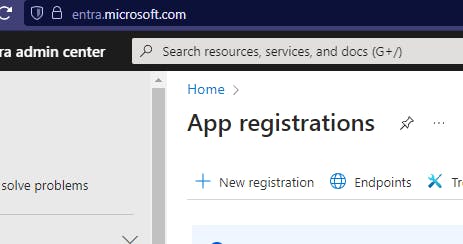
and register a new application

I have registered the application under the name Azure Data Service Fabric. We would required Client ID and Tenant ID values to reference in the code from the registered app.


Also Client Secrets will be required to be referenced in the code.
The Code
Create a new Console application and declare a bunch of variables.
We would use Azure DataLakeServiceClient and DataLakeFileSystemClient class references to manipulate lakehouse resources and file system.
 private static string clientId = "Client Id of the Registered App";
 private static string tenantId = "Tenant Id of the Registered App";
 private static string clientSecret = "Client Secret of the Registered App";
 private static string workspaceName = "Your Workspace";
 private static string lakeHouse = "Your LakeHouse";
 private static ClientSecretCredential credential;
 private static string endpoint = $"https://onelake.dfs.fabric.microsoft.com";
 private static DataLakeServiceClient datalake_Service_Client;
 private static DataLakeFileSystemClient dataLake_FileSystem_Client;
Method to return a Credential object for the service principal
static async Task ReturnCredentials(string baseUrl)
   {
       credential = new ClientSecretCredential(tenantId, clientId, clientSecret);
   }
Lets create a folder in a lakehouse through Azure Data Lake services
  public static async Task CreateFolder(string endpoint)
  {
      DataLakeDirectoryClient dataLake_DirClient = await dataLake_FileSystem_Client.CreateDirectoryAsync($"{lakeHouse}.Lakehouse/Files/New_Folder");
      System.Console.WriteLine($"Directory: {dataLake_DirClient.Name} created");
  }
Call to the above method
await CreateFolder(endpoint);

Now rename the created folder:
  public static async Task RenameFolder()
  {
      DataLakeDirectoryClient dataLake_DirClient_1 = dataLake_FileSystem_Client.GetDirectoryClient($"{lakeHouse}.Lakehouse/Files/New_Folder");
      DataLakeDirectoryClient dataLake_DirClient_2 = await dataLake_DirClient_1.RenameAsync($"{lakeHouse}.Lakehouse/Files/Old_Folder");
      System.Console.WriteLine($"Directory {dataLake_DirClient_1.Name} has been renamed. New name: {dataLake_DirClient_2.Name}");
  }
Call to the above method:
await RenameFolder();

Now lets upload all files from a given local directory to a folder on the Lakehouse that we had created earlier
 public static async Task UploadFiles(string uploadfrom)
 {
     DirectoryInfo d = new DirectoryInfo(uploadfrom);
     DataLakeDirectoryClient dataLake_DirClient = dataLake_FileSystem_Client.GetDirectoryClient($"{lakeHouse}.Lakehouse/Files/Old_Folder");
     foreach (FileInfo file in d.GetFiles())
     {
         DataLakeFileClient fileToUploadClient = dataLake_DirClient.CreateFile(file.Name);
         FileStream fileStream = System.IO.File.OpenRead(file.FullName);
         await fileToUploadClient.AppendAsync(fileStream, offset: 0);
         await fileToUploadClient.FlushAsync(position: fileStream.Length);
     }
     await foreach (PathItem pathItem in dataLake_DirClient.GetPathsAsync(recursive: true))
     {
         System.Console.WriteLine($"Uploaded file: {pathItem.Name}");
     }
 }
Call to the above method
await UploadFiles("Your Upload Path");

Now lets download the same files from the lakehouse folder to a local directory
  public static async Task DownloadFiles(string downloadto)
  {
      DataLakeDirectoryClient dataLakeDirectoryClient = dataLake_FileSystem_Client.GetDirectoryClient($"{lakeHouse}.Lakehouse/Files/Old_Folder");

      await foreach (PathItem pathItem in dataLakeDirectoryClient.GetPathsAsync(recursive: true))
      {

          DataLakeFileClient fileToDownload = dataLakeDirectoryClient.GetFileClient(Path.GetFileName(pathItem.Name));
          Response<FileDownloadInfo> downloadResponse = await fileToDownload.ReadAsync();

          StreamReader reader = new StreamReader(downloadResponse.Value.Content);

          FileStream fileStream = System.IO.File.Open(downloadto + "\\" + Path.GetFileName(pathItem.Name), FileMode.OpenOrCreate);

          using (var reader_1 = new StreamReader(fileStream))
          {
            using (var writer = new StreamWriter(fileStream))
              {
               while (!reader.EndOfStream)
                  {
                      string line = await reader.ReadLineAsync(); // Asynchronously read the line
                      await writer.WriteLineAsync(line); // Asynchronously write the line
                  }
                  writer.Close();
              }
              System.Console.WriteLine($"Downloaded file: {(pathItem.Name)}");
              reader_1.Close();
          }
          reader.Close();

      }
  }
Call to the above method
await DownloadFiles("Your Download Path");

Complete code
using Azure;
using Azure.Identity;
using Azure.Storage.Files.DataLake;
using Azure.Storage.Files.DataLake.Models;

namespace Azure_DataLake_Fabric
{
    internal class Program
    {
        private static string clientId = "Client Id of the Registered App";
        private static string tenantId = "Tenant Id of the Registered App";
        private static string clientSecret = "Client Secret of the Registered App";
        private static string workspaceName = "Your Workspace";
        private static string lakeHouse = "Your LakeHouse";
        private static ClientSecretCredential credential;
        private static string endpoint = $"https://onelake.dfs.fabric.microsoft.com";
        private static DataLakeServiceClient datalake_Service_Client;
        private static DataLakeFileSystemClient dataLake_FileSystem_Client;


        static async Task Main(string[] args)
        {

            ReturnCredentials(endpoint);
            datalake_Service_Client = new DataLakeServiceClient(new Uri(endpoint), credential);
            dataLake_FileSystem_Client = datalake_Service_Client.GetFileSystemClient(workspaceName);

             /* Method Calls */
             await CreateFolder();
             await RenameFolder();
             await UploadFiles("Your Upload Path");
             await DownloadFiles("Your Download Path");
        }

        public static async Task CreateFolder()
        {
            DataLakeDirectoryClient dataLake_DirClient = await dataLake_FileSystem_Client.CreateDirectoryAsync($"{lakeHouse}.Lakehouse/Files/New_Folder");
            System.Console.WriteLine($"Directory: {dataLake_DirClient.Name} created");
        }
        public static async Task RenameFolder()

        {
            DataLakeDirectoryClient dataLake_DirClient_1 = dataLake_FileSystem_Client.GetDirectoryClient($"{lakeHouse}.Lakehouse/Files/New_Folder");
            DataLakeDirectoryClient dataLake_DirClient_2 = await dataLake_DirClient_1.RenameAsync($"{lakeHouse}.Lakehouse/Files/Old_Folder");
            System.Console.WriteLine($"Directory {dataLake_DirClient_1.Name} has been renamed. New name: {dataLake_DirClient_2.Name}");
        }
        public static async Task UploadFiles(string uploadfrom)
        {

            DirectoryInfo d = new DirectoryInfo(uploadfrom);
            DataLakeDirectoryClient dataLake_DirClient = dataLake_FileSystem_Client.GetDirectoryClient($"{lakeHouse}.Lakehouse/Files/Old_Folder");

            foreach (FileInfo file in d.GetFiles())
            {

                DataLakeFileClient fileToUploadClient = dataLake_DirClient.CreateFile(file.Name);
                FileStream fileStream = System.IO.File.OpenRead(file.FullName);
                await fileToUploadClient.AppendAsync(fileStream, offset: 0);
                await fileToUploadClient.FlushAsync(position: fileStream.Length);

            }

            await foreach (PathItem pathItem in dataLake_DirClient.GetPathsAsync(recursive: true))
            {
                System.Console.WriteLine($"Uploaded file: {pathItem.Name}");
            }
        }

        public static async Task DownloadFiles(string downloadto)
        {
            DataLakeDirectoryClient dataLakeDirectoryClient = dataLake_FileSystem_Client.GetDirectoryClient($"{lakeHouse}.Lakehouse/Files/Old_Folder");

            await foreach (PathItem pathItem in dataLakeDirectoryClient.GetPathsAsync(recursive: true))
            {

                DataLakeFileClient fileToDownload = dataLakeDirectoryClient.GetFileClient(Path.GetFileName(pathItem.Name));
                Response<FileDownloadInfo> downloadResponse = await fileToDownload.ReadAsync();
                StreamReader reader = new StreamReader(downloadResponse.Value.Content);
                FileStream fileStream = System.IO.File.Open(downloadto + "\\" + Path.GetFileName(pathItem.Name), FileMode.OpenOrCreate);

                using (var reader_1 = new StreamReader(fileStream))
                {
                    using (var writer = new StreamWriter(fileStream))
                    {

                        while (!reader.EndOfStream)
                        {
                            string line = await reader.ReadLineAsync(); // Asynchronously read the line
                            await writer.WriteLineAsync(line); // Asynchronously write the line
                        }
                        writer.Close();
                    }
                    System.Console.WriteLine($"Downloaded file: {(pathItem.Name)}");
                    reader_1.Close();
                }
                reader.Close();

            }
        }
        static async Task ReturnCredentials(string baseUrl)
        {
            credential = new ClientSecretCredential(tenantId, clientId, clientSecret);
        }

    }
}
Conclusion
In conclusion, we can leverage Azure DataLake Service to manage a Fabric Lakehouse efficiently . By leveraging the capabilities of Azure DataLake Service, we automate storage and retrieval processes outside of the Fabric ecosystem. Whether uploading, downloading, or managing files, the seamless interaction with the Fabric Lakehouse enhances overall data management and operational efficiency.
Thanks for reading !!!




