SemPy library for Semantic link
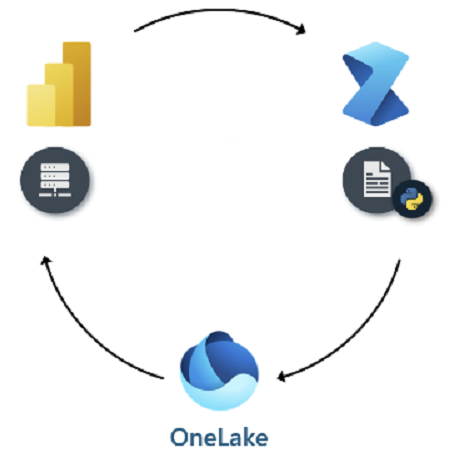
Semantic link have significantly transformed the way we connect and understand data in Microsoft Fabric. By definition, Semantic link is a feature that allows you to establish a connection between Semantic models and Synapse Data Science in Microsoft Fabric.
It provides a way to define relationships and enhance the metadata of your data, making it easier to analyze and visualize data across different datasets.
This article would focus on usage of SemPy library that can be leveraged to maintain your Fabric ecosystem and automate the overall Fabric processes.
What is SemPy ?
The sempy library developed in Python is designed to facilitate interactions with semantic models and data within the Fabric ecosystem.
Some key features of the sempy library include the ability to:
Access, filter, and query semantic data models.
Conduct sophisticated data transformations.
Leverage Python's data processing tools (like Pandas and other libraries) alongside Fabric's semantic models.
Utilize existing Power BI models within custom Python applications to enable more complex analytical use cases beyond the capabilities of GUI tools.
In this article we would delve into FabricRestClient class of the sempy library
FabricRestClient class in the sempylibrary pretty much does similar things that Fabric REST API’s do. I have already blogged on Fabric REST API’s. You can check it out here .
The Setup
Create a new Notebook and set the language to Pyspark(Python).Import the following libraries into the notebook
import sempy
import sempy.fabric as fabric
import json
from pyspark.sql.functions import col,lit
import pandas as pd
After you’ve done this, it’s easy to start working with semantic link. Below I am going to retrieve get details of the current workspace. For that we invoke the FabricRestClient class.
workspaceID = fabric.get_workspace_id()
workspaceName = fabric.resolve_workspace_name(workspaceID)
client = fabric.FabricRestClient()
response = client.get(f"/v1/workspaces/{workspaceID}")
responseJson = response.json()
items= pd.json_normalize(responseJson, sep='_')

df = spark.createDataFrame(items)

result_df = df.select(col("displayName").alias("Name"),
                      col("type").alias("Type"),
                      col("description").alias("Description"))
display(result_df)
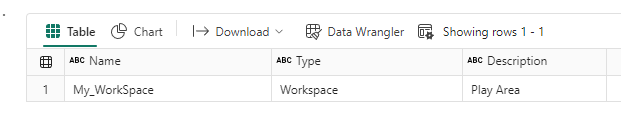
The code will produce an output displaying the Name, Type, and Description properties of the workspace.
Lets expand the code a bit to get the list of all the items in the workspace.
workspaceID = fabric.get_workspace_id()
workspaceName = fabric.resolve_workspace_name(workspaceID)
client = fabric.FabricRestClient()
response = client.get(f"/v1/workspaces/{workspaceID}/items")
responseJson = response.json()
items= pd.json_normalize(responseJson['value'], sep='_')

df = spark.createDataFrame(items)

result_df = df.select(lit(workspaceName).alias("WorkSpace"),
                      col("displayName").alias("Name"),
                      col("type").alias("Type"),
                      col("description").alias("Description"))
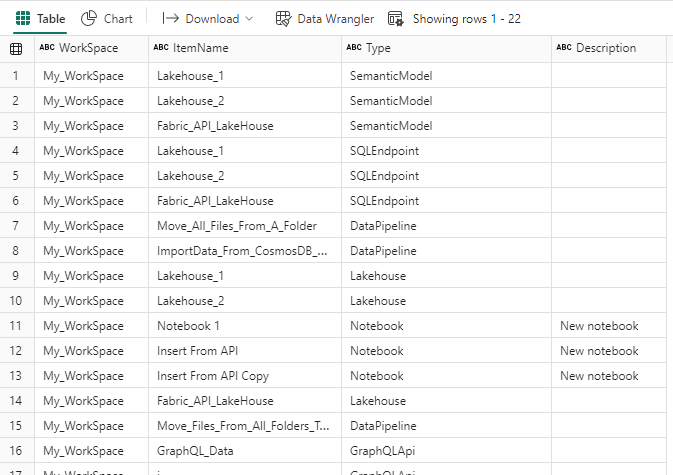
display(result_df)
Now this code will return a list of all the items in the workspace.
Now in case you want to fetch the details of particular type example lets say the details of all the Lakehouses in the current workspace. For example the connectionstring and the filepath for the lakehouses
workspaceID = fabric.get_workspace_id()
workspaceName = fabric.resolve_workspace_name(workspaceID)
client = fabric.FabricRestClient()
response = client.get(f"/v1/workspaces/{workspaceID}/lakehouses")
responseJson = response.json()
items= pd.json_normalize(responseJson['value'], sep='_')

df = spark.createDataFrame(items)

result_df = df.select(lit(workspaceName).alias("WorkSpace"),
                      col("displayName").alias("Name"),
                      col("type").alias("Type"),
                      col("description").alias("Description"),
                      col("properties_sqlEndpointProperties_connectionString").alias("ConnectionString"),
                      col("properties_oneLakeFilesPath").alias("OneLakeFilePath")))
display(result_df)

or if want to fetch details of a specific lakehouse. I am unsure if there is a specific property that can be queried to get the details of the lakehouse based on the name
Only way that I could think was to query the dataframe directly to fetch the details of the lakehouse name.
workspaceID = fabric.get_workspace_id()
workspaceName = fabric.resolve_workspace_name(workspaceID)
lakehouseName="Lakehouse_1"
client = fabric.FabricRestClient()
response = client.get(f"/v1/workspaces/{workspaceID}/lakehouses")
responseJson = response.json()
items= pd.json_normalize(responseJson['value'], sep='_')

df = spark.createDataFrame(items)

result_df = df.select(lit(workspaceName).alias("WorkSpace"),
                      col("displayName").alias("Name"),
                      col("type").alias("Type"),
                      col("description").alias("Description"),
                      col("properties_sqlEndpointProperties_connectionString").alias("ConnectionString"),
                      col("properties_oneLakeFilesPath").alias("OneLakeFilePath")))
display(result_df.where(result_df.ItemName == lakehouseName) )

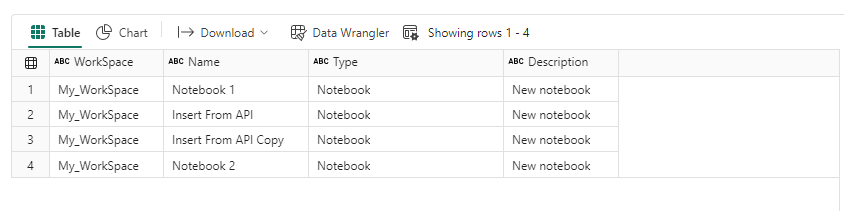
Similarly you could fetch the details of all the Notebooks in your workspace
workspaceID = fabric.get_workspace_id()
workspaceName = fabric.resolve_workspace_name(workspaceID)
lakehouseName="Lakehouse_1"
client = fabric.FabricRestClient()
response = client.get(f"/v1/workspaces/{workspaceID}/Notebooks")
responseJson = response.json()
items= pd.json_normalize(responseJson['value'], sep='_')

df = spark.createDataFrame(items)

result_df = df.select(lit(workspaceName).alias("WorkSpace"),
                      col("displayName").alias("Name"),
                      col("type").alias("Type"),
                      col("description").alias("Description"))
display(result_df.where(result_df.ItemName == lakehouseName) )
Summary
That’s it. That’s how easy it is to get an overview of your fabric ecosystem and the underlying artifacts.
This is just one of the many ways you can use Semantic Link in Microsoft Fabric and perhaps it’s not even one of the most common use cases . In another blog I will demonstrate how easy it is to retrieve datasets, copy data in lakehouses, visualize relationship in your semantic model using the Sempy library.




